Terminal Based Gui utility System-config-network for configuring ip address, subnet mask, gateway, DNS for each Network Connection is no longer supported in RHEL6.
There are so many changes in RHEL6 and its variants like CentOS6 and other.
It was really a very user friendly utility specially for newbies and Linux begginers...
Please Read our next post for configuring network interfaces in old classic Unix / Linux style... directly modifying config file.

xen-hvm-qemu
Xen-HVM
The Xen virtual machine monitor can run in HVM (hardware virtual machine) mode, using Intel VT-x or AMD-V hardware x86 virtualization extensions. This means that instead of paravirtualized devices, a real set of virtual hardware is exposed to the domU to use real device drivers to talk to.
QEMU includes several components: CPU emulators, emulated devices, generic devices, machine descriptions, user interface, and a debugger. The emulated devices and generic devices in QEMU make up its device models for I/O virtualization.
Xen-HVM has device emulation based on the QEMU project to provide I/O virtualization to the VMs. Hardware is emulated via a patched QEMU "device model" (qemu-dm) daemon running as a backend in dom0. This means that the virtualized machines see as hardware: a PIIX3 IDE (with some rudimentary PIIX4 capabilities), Cirrus Logic or plain VGA emulated video, RTL8139 or NE2000 network emulation, PAE, and somewhat limited ACPI and APIC support and no SCSI emulation.
The Xen virtual machine monitor can run in HVM (hardware virtual machine) mode, using Intel VT-x or AMD-V hardware x86 virtualization extensions. This means that instead of paravirtualized devices, a real set of virtual hardware is exposed to the domU to use real device drivers to talk to.
QEMU includes several components: CPU emulators, emulated devices, generic devices, machine descriptions, user interface, and a debugger. The emulated devices and generic devices in QEMU make up its device models for I/O virtualization.
Xen-HVM has device emulation based on the QEMU project to provide I/O virtualization to the VMs. Hardware is emulated via a patched QEMU "device model" (qemu-dm) daemon running as a backend in dom0. This means that the virtualized machines see as hardware: a PIIX3 IDE (with some rudimentary PIIX4 capabilities), Cirrus Logic or plain VGA emulated video, RTL8139 or NE2000 network emulation, PAE, and somewhat limited ACPI and APIC support and no SCSI emulation.
CEntOS6 will release soon
There are only 2-3 dys remaining for Official CentOS version 6 release.. QA and all process are Tested now the will put Centos6 ISO file within some days.. We will update download link as soon as possible

Mount NTFS Hdd in CetnOS/ RHEL
CEntOS - 5 and RHEL-5 is not supporting mounting of NTFS partition, fix harddisk, removable usb harddisk with NTFS partition
some packages need to be installed on it to make NTFS mountable
which are fuse and fuse-ntfs-3g
first of all apply this command to install these packages :
# yum install fuse fuse-ntfs-3g
after installing get the device name of connected hdd which we are going to mount
fdisk -l
in this example external hdd with ntfs partition is sdb2
make a directory / folder to mount hdd
# mkdir /media/hdd
mount sdb2 by this command
mount /dev/sdb2 /media/hdd
and you are doneeeeeeeee......
now you can access the data from ntfs mounted partition
some packages need to be installed on it to make NTFS mountable
which are fuse and fuse-ntfs-3g
first of all apply this command to install these packages :
# yum install fuse fuse-ntfs-3g
after installing get the device name of connected hdd which we are going to mount
fdisk -l
in this example external hdd with ntfs partition is sdb2
make a directory / folder to mount hdd
# mkdir /media/hdd
mount sdb2 by this command
mount /dev/sdb2 /media/hdd
and you are doneeeeeeeee......
now you can access the data from ntfs mounted partition
DNS server types
- master
- Stores original and authoritative zone records for a namespace, and answers queries about the namespace from other nameservers.
- slave
- Answers queries from other nameservers concerning namespaces for which it is considered an authority. However, slave nameservers get their namespace information from master nameservers.
- caching-only
- Offers name-to-IP resolution services, but is not authoritative for any zones. Answers for all resolutions are cached in memory for a fixed period of time, which is specified by the retrieved zone record.
- forwarding
- Forwards requests to a specific list of nameservers for name resolution. If none of the specified nameservers can perform the resolution, the resolution fails.
system-config-network
system-config-network tool is very helpful for configuring network address.
With root access you can start this command based gui tool by applying this command.
[root@vps ~]# system-config-network
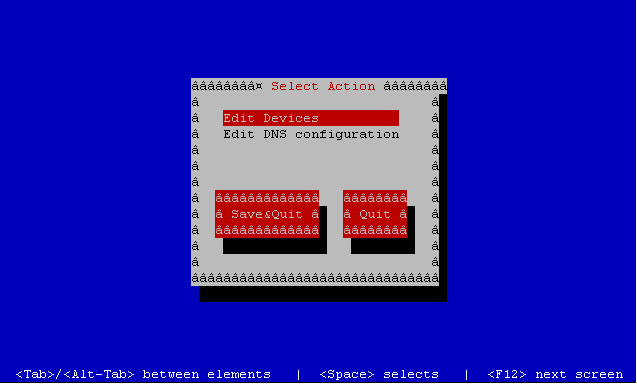
With root access you can start this command based gui tool by applying this command.
[root@vps ~]# system-config-network


how to make a iso image from cdrom under CentOS/RHEL
In Virtualization everything is virtual, so if you are planning for a virtual machine installation. it will be easy for you to make a iso image from cd/dvd and mount it as a virtual cdrom..
in linux dd command can do this things ..
This is an Example :
[root@vps ~]# dd if=/dev/cdrom of=xp.iso
dd command will make a xp.iso image file from physical cdrom..
in linux dd command can do this things ..
This is an Example :
[root@vps ~]# dd if=/dev/cdrom of=xp.iso
dd command will make a xp.iso image file from physical cdrom..
Nic emulation supported by xen
The following emulated network interface cards are available for Xen HVM guests in Xen 3.4:
- e100
- e1000
- rtl8139
- ne2k_pci
- pcnet
Emulation is done by Qemu-dm running for each Xen HVM guest. Intel e1000 is known to be the best performing emulated NIC. Even faster is to use PV-on-HVM drivers, which totally bypasses emulation.
Subscribe to:
Posts (Atom)